Robot vacuums save us hours of tedious floor cleaning every week. These automated helpers pick up dust, pet hair, and crumbs while we focus on other tasks. However, they require regular attention to keep doing their jobs effectively. Learning how to maintain your robot vacuum for lasting performance ensures your floors stay clean. Ignoring basic upkeep leads to clogged brushes, weak suction, and shortened battery life.
This guide covers the essential steps to keep your automated cleaner in top shape. We will walk through daily, weekly, and monthly cleaning routines. You will learn how to clear tangled hair from the main brush roll and wipe down crucial sensors. Replacing worn parts on schedule also plays a big role in long-term reliability. Following these simple habits will extend the life of your machine and save you money on premature replacements.
Emptying the Dustbin and Cleaning Filters
The dustbin is the most frequently handled part of your robot vacuum. You should empty it after every single cleaning cycle to prevent clogs. A full bin restricts airflow and drastically reduces the suction power of the machine. Most models have a simple release button that lets you slide the bin out. Tap the bin gently against the inside of your trash can to dislodge stubborn debris.
Filters trap fine dust particles and allergens before the air exhausts back into your room. You need to tap the filter clean at least once a week. Some filters are washable, but you must let them dry completely for 24 hours before reinstalling them. Wet filters will ruin the motor and void your warranty. Replace the filter every two to three months to maintain strong suction.
Clearing the Main Brush Roll
The main brush roll does the heavy lifting when it comes to agitating carpet fibers. Hair and string wrap tightly around this spinning cylinder during normal operation. If you leave this tangled mess alone, the motor has to work much harder to spin the brush. This extra strain drains the battery faster and can eventually burn out the motor. Check the brush roll once a week and remove it from its housing.
Most manufacturers include a small cleaning tool with a recessed blade. Use this tool to slice through thick bands of wrapped hair safely. Pull the cut hair away from the bristles and check the bearings on both ends of the roller. Hair often sneaks into the side caps and causes friction. Snap the clean brush back into place and secure the brush guard.
Maintaining Side Brushes and Sensors
Side brushes sweep dirt away from baseboards and push it into the main suction path. These small spinning arms often get bent or tangled with long pet hair. You can usually unscrew or pop off the side brush to pull away trapped debris. If the bristles look permanently bent, soaking them in warm water for a few minutes can help them regain their shape. You will eventually need to swap them out for new ones when they become too frayed.
Your robot relies on a network of sensors to avoid stairs and map your rooms. Dust buildup on these optical sensors causes the machine to bump into walls or spin in circles. Take a dry microfiber cloth and gently wipe the cliff sensors on the bottom of the unit. You should also wipe the front bumper and the top navigation turret. Doing this every two weeks keeps your vacuum moving accurately.
Replacing Worn Parts on Schedule
No matter how well you clean your vacuum, certain parts simply wear out over time. Rubber brushes lose their tread, and filters eventually become permanently clogged with microscopic dust. Keeping a fresh supply of replacement components on hand prevents frustrating downtime. You should consult your user manual to find the exact replacement intervals for your specific model. Swapping out old parts restores the cleaning efficiency to factory levels.
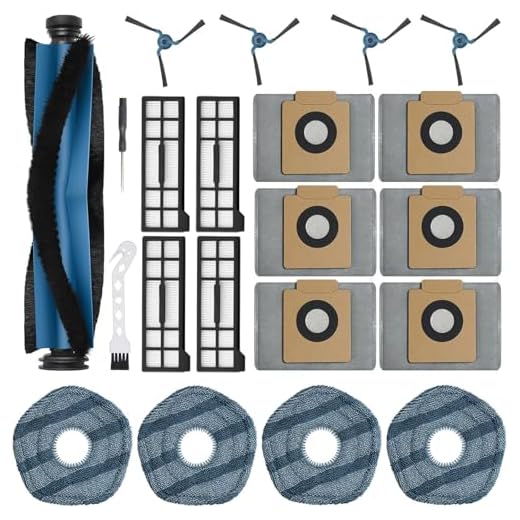
Owners of the Eufy X10 Pro Omni can easily refresh their machine with a dedicated parts bundle. The 21Pcs X10 Pro Omni Replacement Parts Kit for Eufy X10 Pro Omni Robot Vacuum Acce includes everything needed for a complete overhaul. This kit provides fresh main brushes, side brushes, filters, and mop pads. Having all these items in one package makes routine maintenance much simpler. You can just grab a new filter or brush from the box whenever you notice a drop in performance.
Eufy X10 Pro Omni 21-Piece Replacement Kit
Servicing iRobot Roomba Models
Roomba vacuums feature unique dual multi-surface rubber brushes instead of traditional bristles. These rubber extractors resist hair tangles better than standard brushes, but they still require regular inspection. You must check the ends of the rubber rollers where hair tends to accumulate around the gray and green caps. Removing these caps lets you slide off the trapped hair rings quickly. The side sweeping brush on these models also needs a Phillips screwdriver for removal.
Finding the right components for your specific Roomba series keeps the machine running smoothly. The Replacement Parts & Accessories for iRobot E, I & J Series, Combo i5, j5 Series offers a convenient way to restock your supplies. This set includes the dual rubber brushes, edge-sweeping brushes, and high-efficiency filters. Replacing the rubber extractors every six months ensures they maintain proper contact with your hard floors and carpets. Fresh filters and side brushes complete the tune-up process.
CHIKIXSON Replacement Parts for Roomba E/I/J Series

Final Thoughts
Taking care of your automated cleaner requires only a few minutes of your time each week. Regular cleaning of the brushes, sensors, and filters prevents major mechanical failures down the road. Sticking to a consistent maintenance schedule ensures your floors always look their best.
Frequently Asked Questions
How often should I replace the filter in my robot vacuum?
You should replace the filter every two to three months under normal use. Homes with multiple pets might require monthly filter changes to maintain strong suction.
Can I wash the main brush roll with water?
You should generally avoid washing the main brush roll with water unless the manufacturer explicitly allows it. Water can rust the metal bearings at the ends of the roller.
Why is my robot vacuum spinning in circles?
A robot vacuum usually spins in circles when its bumper is stuck or its drop sensors are dirty. Wiping the sensors with a dry microfiber cloth and tapping the bumper to dislodge debris usually fixes the issue.