Finally, a Real Solution for a Grimy Keyboard
This little dual-action gadget is the only thing that has ever truly cleaned the gunk from between my laptop keys.
For anyone who eats at their desk or just can’t stand the dust buildup on screens and in crevices, the OXO Grips brush is a specialized tool that feels indispensable once you use it. It’s designed for the detailed, frustrating cleaning jobs that a regular duster or cloth can’t handle, making it perfect for the meticulous user.
- Dual-Action is a Game-Changer The combination of a soft brush for surfaces and a silicone wiper for crevices means you can tackle different types of grime with a single tool.
- Silicone Wiper is the MVP While the bristles are good, the slim silicone wiper is the real star, effortlessly scraping out dust and debris from tight keyboard channels and speaker grilles.
- Designed for Portability Its pen-like size, retractable bristles, and capped wiper make it easy to throw in a laptop bag or keep in a desk drawer without it getting dirty or damaged.
- More Than Just Keyboards It’s surprisingly effective for detail work on camera lenses (bristle side only), phone charging ports, and the seams of a TV remote or gaming controller.
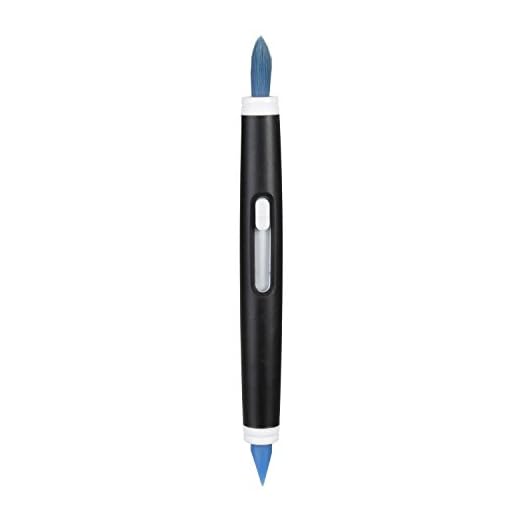
Its slim silicone wiper and soft, retractable bristles get into the tightest crevices of keyboards and camera lenses, safely removing dust and grime without scratching delicate surfaces.
| Primary Cleaning Head | Soft Bristles |
| Secondary Cleaning Head | Slim Silicone Wiper |
| Primary Function | Dust and Debris Removal |
| Intended Use | Keyboards, Screens, Lenses, Small Crevices |
| Bristle Storage | Retractable Slider |
| Wiper Storage | Protective Cap |
| Form Factor | Pen-sized |
- Retractable bristles stay clean and protected, preventing transfer of dirt on the next use.
- Slim silicone wiper effectively gets into and scrapes out grime from between keyboard keys.
- Soft bristles are gentle enough for delicate surfaces like camera lenses and phone screens.
- Compact, lightweight design is ideal for a desk drawer, car console, or travel bag.
- The cap fits securely over the silicone wiper, keeping it pristine.
- Bristles could be slightly stiffer to dislodge more stubborn, caked-on debris.
- The silicone wiper can accumulate gunk that is sometimes difficult to clean off the wiper itself.
- Not a substitute for compressed air for deep cleaning mechanical keyboards or PC internals.
Choosing the right Microfiber Dusters
-
Cleaning Head TypeHighThe effectiveness of a duster is determined by its head. Different materials and shapes are suited for different tasks. Microfiber grabs fine dust, while bristles can get into crevices.Look forA tool with the right head for your primary task—soft bristles for electronics, large microfiber pads for surfaces, or a combination tool.AvoidOverly stiff bristles that could scratch delicate items or cheap materials that just push dust around.
-
Reach and SizeHighConsider the areas you need to clean. A small, handheld tool is useless for a ceiling fan, and a large duster is clumsy for a keyboard.Look forA size and shape that matches your most common cleaning jobs. For electronics, look for pen-sized, detailed tools.AvoidA 'one-size-fits-all' tool that is too large for details and too small for large surfaces.
-
Washability and MaintenanceHighA duster is only effective when it's clean. The ease of cleaning the tool itself is a critical factor for long-term use.Look forRemovable, machine-washable heads for larger dusters, or simple, wipe-clean designs for smaller tools.AvoidProducts that are difficult or impossible to clean, as a dirty duster is an ineffective one.
-
StorageMediumProper storage keeps your cleaning tool clean and effective for the next use. Exposed duster heads can collect ambient dust while stored.Look forFeatures like retractable heads, protective caps, or included storage cases/pouches.AvoidTools with no way to protect the cleaning surface during storage.
Common questions
Can you wash the brush part of the tool?
Yes, the bristles can be gently hand-washed with a small amount of soap and water. It is crucial to let them air dry completely before retracting them into the body to prevent any moisture buildup or mildew.
Is the silicone wiper safe to use on camera lenses or screens?
No. The silicone wiper is designed for scraping debris from hard, non-sensitive crevices like the spaces between keyboard keys. For delicate surfaces like camera lenses or screens, you should only use the soft, retractable bristle brush to gently sweep away dust.
How does this compare to a can of compressed air?
They serve different, but complementary, purposes. This OXO brush is for surface-level dust and for scraping out grime from crevices. Compressed air is for blowing loose dust out from deep inside a device. The brush is better for stuck-on particles, while air is better for hard-to-reach internal components.
Will the bristles scratch my phone or monitor screen?
The bristles are intentionally made to be very soft and are designed specifically for use on delicate electronic surfaces. They will not scratch screens or lenses when used for their intended purpose of sweeping away light dust and lint.
The OXO Grips Electronics Cleaning Brush excels with its smart, dual-function design. The soft bristles handle surface dust beautifully, but the silicone wiper is the standout feature, effortlessly cleaning tight spaces. While it won’t replace compressed air for deep cleans, it’s an indispensable gadget for daily tech maintenance.
- Dual-ended design features soft bristles for screens and a firm silicone wiper for crevices.
- Retractable bristles and a protective cap keep the tool clean and compact for storage or travel.
- Perfectly sized for detailing keyboards, camera lenses, charging ports, and other small electronic gaps.
For anyone meticulous about their workspace, the OXO Grips Electronics Cleaning Brush is a must-have. It is the perfect weapon in the daily fight against dust and crumbs on keyboards, screens, and other gadgets. Its compact and thoughtful design makes it a simple, effective, and highly recommended tool.


