A stuck robot vacuum defeats the entire purpose of automated cleaning. You bought this machine to save time. Now you spend ten minutes hunting it down under the guest bed. That stops today. You can fix most navigation errors with a few basic adjustments to your floor plan and the vacuum’s sensors.
The fastest way to rescue a trapped vacuum is to power it down immediately, clear the main brush roll of obstructions, and manually return it to the base station. You will then need to map out physical barriers or digital no-go zones to prevent a repeat performance.
Understanding Why Your Vacuum Gets Stuck
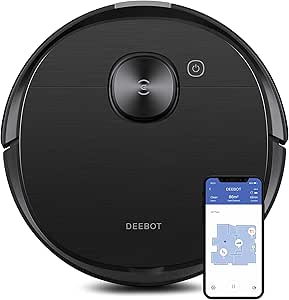
Robot vacuums rely on optical sensors and bumper switches to navigate your home. They fail when these sensors get confused by dark rugs, loose cables, or low-clearance furniture. My iRobot Roomba j9+ once wedged itself under a low couch because the bumper cleared the fabric skirt but the top sensor caught the frame. You must identify these specific trap zones in your house. Advanced models like the Ecovacs Deebot T8 AIVI will send an alert with a photo of the obstacle. Use that data to map out your problem areas.
Steps to Free a Stuck Robot Vacuum
Turn off the power immediately. A stuck vacuum will burn out its wheel motors trying to break free. Lift the unit straight up. You need to check the main extractor brush and the side spinning brushes for tangled cords or carpet threads. I have found that models like the Roborock Qrevo QV 35A require a firm pull to dislodge debris from the wheel axles. Clear the immediate area of whatever trapped the machine. Place the vacuum back on the floor facing the base station and press the home button.
Preventing Future Mishaps
You have to prep your floors before the cleaning cycle starts. Pick up phone chargers, socks, and pet toys. You can use furniture risers to give your vacuum enough clearance to clean under your sofa without getting trapped. Modern units like the iRobot Roomba j9+ allow you to draw digital no-go zones in the companion app. Map out a red box over your cable-heavy entertainment center. This five-minute software tweak saves you from daily rescue missions.
When to Seek Professional Help
Hardware fails. If your vacuum spins in circles or repeatedly rams into a blank wall, the internal cliff sensors or LIDAR dome might be broken. You can try wiping the sensor windows with a dry microfiber cloth. If the navigation errors continue, you need to contact customer support. Brands like Ecovacs can run remote diagnostics on models like the Deebot T8 AIVI to pinpoint the exact hardware failure. Check your warranty status before opening the chassis yourself.
🎯 Key Takeaways
Identify physical traps like low furniture and dark rugs before starting a cycle. Power down the vacuum immediately when it gets stuck to protect the wheel motors from burning out. You can draw digital no-go zones in your companion app to block off cable-heavy areas. Wipe down the navigation sensors with a dry microfiber cloth if the unit starts spinning in circles.
Recommended Products
Here are a few replacement parts and accessories to keep your vacuum running smoothly:


Final Thoughts
Stop rescuing your robot vacuum every afternoon. Map out your digital no-go zones and pick up your loose cables. Check your app for the latest firmware update right now to improve your machine’s navigation logic.


