When your robot vacuum wedges its LIDAR turret under a 3.5-inch sofa clearance, your automated cleaning system becomes a manual rescue mission. You can resolve most navigation failures by isolating the specific sensor trigger—whether it is a false cliff detection on a dark rug or a tangled drive wheel—and adjusting your floor plan accordingly.
The fastest way to rescue a trapped vacuum is to cut the power immediately, clear the main extractor roll of obstructions, and manually return the unit to its base station. You then need to implement physical barriers or digital keep-out zones to prevent the machine from repeating the exact same error tomorrow.
Understanding Why Your Vacuum Gets Stuck
Optical and Tactile Sensor Limitations
Robot vacuums rely on a combination of infrared cliff sensors, bumper switches, and either LIDAR or VSLAM cameras to map your home. They fail when these sensors misinterpret the environment. High-pile carpets or matte black rugs absorb infrared light, tricking the cliff sensors into registering a drop-off. This immediately halts the drive motors. You must identify which specific sensor is triggering the false alarm to correct the navigation error.
Physical Clearance Traps
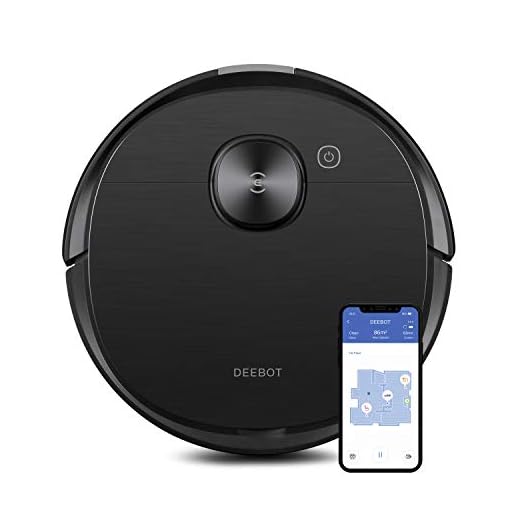
My iRobot Roomba j9+ once wedged itself under a low couch because the physical bumper cleared the fabric skirt, but the top-mounted camera caught the wooden frame. You must measure the exact clearance of your furniture. If a sofa sits at exactly 3.6 inches off the ground and your vacuum is 3.7 inches tall, the machine will repeatedly trap itself. Advanced models like the Ecovacs Deebot T8 AIVI transmit obstacle photos, providing exact data on where your floor plan needs modification.
Steps to Free a Stuck Robot Vacuum
Cut Power and Inspect the Drivetrain
Turn off the power immediately. A trapped vacuum will continuously send current to its wheel motors trying to break free, which can strip the internal plastic gears. Lift the unit straight up by its handle or chassis. Inspect the spring-loaded drive wheels. Press them in and out to ensure the suspension moves freely without grinding against trapped debris. A jammed wheel assembly will force the vacuum into a continuous circular spin.
Clear the Extractors and Reset
Check the main extractor brush and the side spinning brushes for tightly wound USB cords or carpet threads. Models like the Roborock Qrevo QV 35A require a firm pull to dislodge tangled hair from the wheel axles. Once you clear the immediate area of the obstruction, place the vacuum back on the floor facing the base station. Press the home button to force a recalibration of its internal map.
Preventing Future Mishaps
Floor Preparation and Physical Barriers
You have to prep your floors before the scheduling timer triggers a cleaning cycle. Pick up phone chargers, socks, and lightweight pet toys that easily bypass front-facing cameras. If your vacuum constantly wedges under a specific armchair, install furniture risers to increase the clearance by an inch. For older vacuums without smart mapping, lay down magnetic boundary strips under the edges of problematic rugs.
Software Adjustments and Keep-Out Zones
Modern units like the iRobot Roomba j9+ allow you to draw digital no-go zones directly in the companion app. Map out a tight red box over your cable-heavy entertainment center or the dog’s water bowl. Adjusting these digital boundaries takes five minutes and permanently stops the machine from entering known trap zones. Check the map after the next run to verify the vacuum respects the new borders.
When to Seek Professional Help
Diagnosing Hardware Failures
Hardware fails over time. If your vacuum spins in tight circles or repeatedly rams into a blank wall, the internal cliff sensors or the LIDAR dome motor might be broken. Wipe the plastic sensor windows with a dry microfiber cloth to remove dust buildup. If the navigation errors persist, listen for grinding noises from the wheel modules, which indicates a stripped gearbox requiring a full module replacement.
Warranty and Remote Diagnostics
Contact customer support before attempting a teardown. Brands like Ecovacs can run remote diagnostics on models like the Deebot T8 AIVI to pinpoint the exact sensor failure via Wi-Fi. Check your warranty status before grabbing a screwdriver. Opening the chassis to replace a burned-out wheel motor yourself will void active coverage and leave you paying out of pocket for a new unit.
🎯 Key Takeaways
Identify physical traps like 3-inch furniture clearances and dark rugs before starting a cycle. Power down the vacuum immediately when it gets stuck to protect the wheel motors from stripping their gears. Draw digital no-go zones in your companion app to block off cable-heavy areas. Wipe down the infrared navigation sensors with a dry microfiber cloth if the unit starts spinning in circles.
Frequently Asked Questions
Why does my robot vacuum stop in the middle of the room?
A vacuum stopping in an open space usually indicates a false positive from the cliff sensors. Dark-colored flooring or heavy shadows absorb the infrared light, causing the machine to think it is at the edge of a staircase. Wipe the sensors clean or adjust the lighting in the room.
Can I physically push my robot vacuum back to its base?
Do not drag or push the vacuum across the floor. This forces the drive wheels to turn against the resistance of the unpowered motors, which strips the internal gears. Always lift the unit by its handle and carry it directly to the charging dock.
How do I stop my vacuum from getting stuck under the couch?
Measure the height of your vacuum and the clearance of your couch. If the clearance is within a half-inch of the vacuum’s height, install furniture risers to lift the couch. Alternatively, draw a digital keep-out zone over the couch’s footprint in your vacuum’s mobile app.
Recommended Products
Replace worn extractors and damaged wheel modules to maintain proper navigation:


Final Thoughts
Open your vacuum’s mobile app right now and draw a digital keep-out zone over your most problematic furniture. Update the firmware to the latest version to ensure the navigation algorithms handle complex floor plans correctly.


