Bringing a new automated cleaner into your house requires a little bit of upfront work. You might think you can just press a button and let the machine do the rest. The reality is that your floors need to be clear before the cleaning cycle begins. Learning How to Get Your Home Robot Vacuum Ready will save you from rescuing a stuck machine every day. A few simple adjustments to your rooms will make a massive difference in how well the device performs.
Preparing your space helps the sensors map the layout accurately on the first run. It also protects your personal belongings from getting chewed up by the brush roll. You want the machine to reach the edges of your rooms without getting tangled in hazards. Taking time to organize your floors means you can actually enjoy the benefits of automated cleaning. We will walk through the exact steps you need to take to prepare your living space.
Clear the Floors of Small Items
The first step in preparing your space is picking up loose items from the floor. Socks and small toys are the most common culprits that jam up a vacuum brush. You should do a quick sweep of the room before you start a cleaning cycle. Check under the edges of your sofa and bed for hidden objects. Removing these hazards ensures the machine can move freely across the entire room.
Pet bowls and lightweight rugs can also cause problems for automated cleaners. You might want to pick up light floor mats or secure them with double-sided tape. Moving dining chairs away from the table can help the device clean the floor much faster. Some people prefer to put their chairs upside down on the table just like in a restaurant. This simple habit gives the vacuum a clear path to pick up crumbs and dust.
Manage Your Cords and Cables
Loose electrical cords are the biggest enemy of any automated floor cleaner. A vacuum can easily grab a phone charger and pull the entire power strip across the room. You need to gather up excess cord clutter and keep it off the ground. Using a dedicated storage solution helps contain popular sized power strips safely. This keeps your electronics protected while giving the vacuum a clear path along the baseboards.
The D-Line Cable Management Box is made from electrically safe ABS plastic to protect your cables. It features curved edges and pin holes that blend nicely with your home surroundings. Three rear cable entry and exit slots allow for a neat appearance around TV stands or home offices. The large box measures 16.5 inches long by 6.5 inches wide to hold plenty of wires. Hiding your cords inside this box prevents your vacuum from getting tangled during its daily run.
D-Line Cable Management Box

Upgrade to a Smarter Cleaning Machine
Sometimes the best way to prepare your home is to choose a device with better mapping capabilities. Older models bounce around randomly and get stuck on almost anything. Newer machines use smart recognition and 3D structured light to map your home precisely. This advanced dirt detection technology identifies how dirty the floor is and adjusts the cleaning cycle. A smarter machine requires much less manual preparation before it starts working.
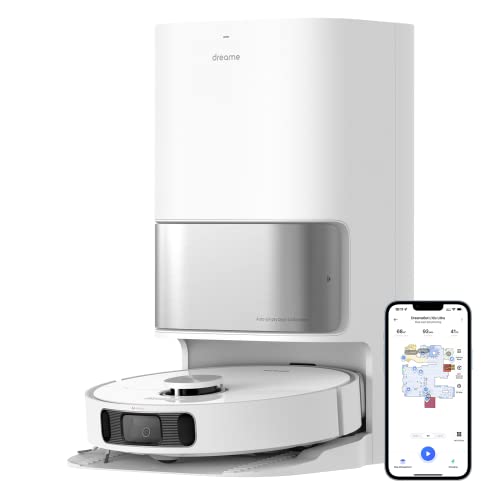
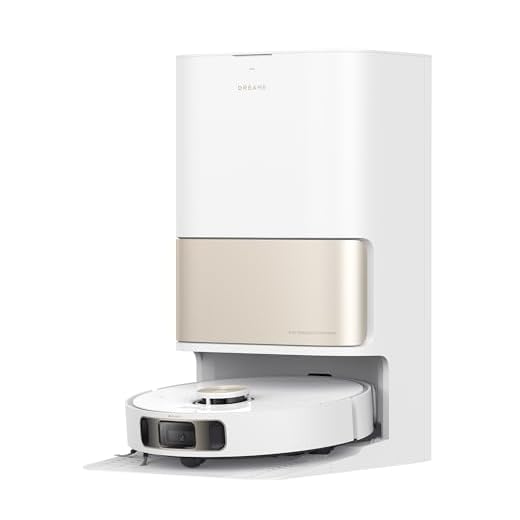
The DREAME L10s Pro Ultra Heat Robot Vacuum and Mop Combo offers 7,000Pa suction power that adapts from hard floors to carpets. It features MopExtend technology with advanced edge recognition to clean deep into corners. The system washes the mop pads with 136 degree hot water to take the household burden off your shoulders. It even performs mop rewashing and floor remopping for a highly thorough cleaning session. This level of smart obstacle avoidance means you spend less time picking up the house.
DREAME L10s Pro Ultra Heat Robot Vacuum and Mop
Set Up Virtual Boundaries and Mapping
Once your floors are clear, you need to let the machine map your house. Most modern devices require an initial mapping run where they explore every room without cleaning. You should open all interior doors so the sensors can see the full layout of your home. Make sure the lighting is adequate if your device relies on optical cameras for movement. The resulting map will appear in your smartphone app for you to review and edit.
The app allows you to draw virtual boundaries around areas you want the vacuum to avoid. You can set no-go zones around pet food stations or delicate furniture pieces. Creating specific room labels lets you send the cleaner to the kitchen after dinner. You can also schedule different cleaning times for different parts of the house. Taking advantage of these digital tools keeps the machine out of trouble and makes your life easier.
Final Thoughts
Getting your home ready for an automated cleaner takes a little bit of planning. Clearing away cords and small objects ensures the machine can do its job without interruption. Investing in smart storage and advanced vacuums will keep your floors looking great every single day.
Frequently Asked Questions
Do I need to move furniture for my robot vacuum?
You do not need to move heavy furniture like sofas or bookshelves. The vacuum will clean around the legs and go under pieces that have enough clearance. Moving lightweight chairs can help the machine clean the area faster.
How do I stop my robot vacuum from getting stuck on rugs?
You can use double-sided carpet tape to secure the edges of lightweight rugs to the floor. If a rug has long tassels, you might need to tuck them under the rug itself. You can also draw a no-go zone over the rug in the companion app.
Should I run my robot vacuum in the dark?
This depends entirely on the mapping technology your specific model uses. Vacuums with LiDAR sensors can move perfectly in pitch black rooms. Models that rely on optical cameras need some ambient light to see obstacles and map the area.